














Your dab pen charger might be the reason your device dies faster than expected. Many users think any USB cable will work, but this often leads to fried batteries, shorter lifespans, and safety risks.
This guide explains how to charge your dab pen safely—from charger types to common mistakes.
If you’re still deciding between devices, see our dab pen vs vape pen guide to understand which option fits your needs.
- Always use the charger designed for your dab pen to ensure safety and prolong battery life.
- Avoid high-wattage phone or laptop chargers that can damage your battery and cause overheating.
- Disconnect your pen promptly after charging and avoid leaving it plugged in overnight to maintain battery health.
- Quick Answer: The Right Dab Pen Charger to Use
- Why the Wrong Dab Pen Charger Damages Your Battery
- Types of Dab Pen Chargers
- How to Charge Your Dab Pen Safely
- Common Dab Pen Charging Mistakes to Avoid
- How to Make Your Dab Pen Battery Last Longer
- Signs You Need a New Battery or Device
- Choosing a Safe Replacement Dab Pen Charger
Quick Answer: The Right Dab Pen Charger to Use
Use the charger that came with your Yocan device. It delivers the exact voltage and current your battery needs—usually 5V at 0.5A to 1A. Using anything else risks your device’s health.
Fast phone chargers often output 18W or more, which is too much power for your dab pen. This causes heat, internal stress, capacity loss, and premature failure.
Here’s a simple table:

If your pen charges much faster or slower than 1–2 hours, it’s a red flag. Either the charger or battery is faulty.
Why the Wrong Dab Pen Charger Damages Your Battery
The 510 thread connection can be wrapped in various bodies; some designs are naturally stealthier.
Voltage vs. Current
Voltage is like water pressure; current (amps) is the flow rate. Your pen needs 5V, the USB standard. Current controls charging speed.
- A 5V/0.5A charger fills your battery slowly and safely.
- A 5V/3A charger forces too much current, stressing the battery.
- USB-C PD and Quick Charge adapters can push voltages up to 20V—dangerous for devices expecting 5V.

Real-World Damage
Using a 65W laptop USB-C PD charger on a dab pen causes overheating. The pen may auto-shutoff randomly, hold charge briefly, then fail.
Risks include:
- Internal overheating damaging cells
- Formation of metal spikes (dendrites) inside the battery
- Sudden battery capacity loss
- Damage to temperature sensors and control boards
- Battery venting or thermal runaway in extreme cases
Overcharge protection circuits help but aren’t foolproof. Using the wrong charger repeatedly wears the battery down.
Types of Dab Pen Chargers
Yocan dab pens use different charging types but all require 5V USB input. Using non-5V sources is unsafe.
Check your device or manual for specs like “Input: 5V ⎓ 0.5–1.0A.”

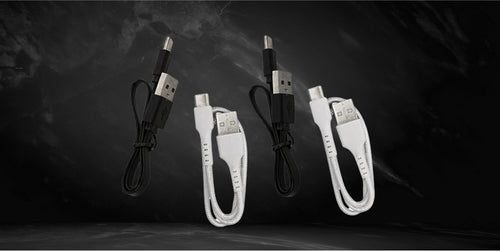
USB-C and Micro-USB Chargers
Most Yocan pens after 2019 have USB-C or micro-USB ports. No battery removal needed—just plug in.
USB-C advantages:
- Reversible plug orientation
- Durable connection (10,000+ insertions)
- Better power negotiation
- Faster charging if supported
Use low-power sources like:
- Computer USB ports (safe amperage)
- Basic 5V/1A wall adapters
- Car adapters under 2A
Disconnect once the LED shows full or after about 2 hours. Avoid leaving plugged in habitually.
510-Thread Screw-On Chargers
The 510-thread standard is older. You unscrew the battery from the cartridge and screw it into a USB adapter puck.
Important: don’t overtighten. Over-tightening can crush the pin or deform contacts, causing charging issues.
The 510-thread standard is older. You unscrew the battery from the cartridge and screw it into a USB adapter puck.
Correct order: plug USB adapter into power first, then gently screw on battery until snug.
Beware counterfeit 510 chargers—they often lack safety features and consistent voltage. Replace lost or damaged chargers only with genuine Yocan or authorized products.
How to Charge Your Dab Pen Safely
Follow these steps every time to extend battery life and stay safe.
- Inspect your charger before use.
- Connect in the correct order.
- Monitor charging.
- Unplug promptly.
Charge on a hard, heat-resistant surface. Avoid soft surfaces like beds or couches that trap heat.
Safety: Never charge damaged or swollen batteries. If you see damage, replace the battery or device immediately.
Charging USB-C or Micro-USB Pens
- Use a 5V USB power source (computer, basic wall adapter, or car charger under 2A).
- Plug the charger into the power source first.
- Connect the other end to your pen’s port.
- Confirm LED lights up (usually red or white).
- Charge 60–120 minutes depending on battery.
- Disconnect when LED turns green or off.
Avoid bending cables sharply near the port. Position the pen so the port isn’t stressed.
LED meanings:
- Red/white = charging
- Green/off = full charge
- Flashing = error, unplug immediately
If pen feels warm after heavy use, let it cool before charging.
Clean the USB port occasionally with a dry cotton swab or compressed air to remove dust and residue.
Charging 510-Thread Batteries
- Plug 510 USB charger into 5V power source.
- Gently screw battery onto charger (hand-tight only).
- Confirm LED lights up.
- Charge 1–2 hours.
- Remove battery when LED turns green.
Never charge 510-thread batteries overnight or beyond 3 hours to avoid heat buildup.
If LED never changes color:
- Try a different USB port or power adapter.
- If still no change, charger or battery may need replacement.
Do not force non-510 batteries onto the adapter; this causes permanent damage.
Replace any 510 charger with visible damage immediately.

Common Dab Pen Charging Mistakes to Avoid
Avoid these to keep your battery healthy:
1. Using Random Phone or Laptop Chargers
Phone chargers negotiate voltages up to 20V and currents higher than your pen needs. Using them can cause excess heat and battery damage.
Stick to 5V USB ports rated 0.5–1A. Avoid chargers labeled:
- PD (Power Delivery)
- QC 3.0 (Quick Charge)
- SuperCharge
- TurboPower
- Warp Charge
If pen feels hot while charging, disconnect and switch to a low-power charger.

2. Leaving Your Dab Pen Plugged In Overnight
Even with overcharge protection, keeping a battery at 100% for hours accelerates wear.
Overnight charging causes:
- Reduced cycle life
- Capacity loss
- Heat exposure
Charge during the day and unplug within 30 minutes of full charge. Set a timer if needed.
Short, frequent partial charges are healthier than full overnight charges.

3. Using Damaged or Cheap Chargers
Look for frayed cables, loose plugs, scorch marks, or chemical smells.
Cheap knockoffs often lack safety features, risking voltage spikes and device failure.
Replace cables or adapters immediately if charging is intermittent or requires holding at an angle.
Buy replacements only from Yocan or authorized sellers.

We also have our line up of cool 510 thread batteries in 5 Cool 510 Thread Battery Designs.
How to Make Your Dab Pen Battery Last Longer
Maximize lifespan with these habits:


Yocan devices typically last 300–500 charge cycles before capacity drops noticeably.
Signs You Need a New Battery or Device

Choosing a Safe Replacement Dab Pen Charger
Lost or damaged your charger? Match these specs:
- Connector type: USB-C, micro-USB, or 510-thread.
- Input rating: 5V.
- Current: 0.5–1A (check device specs).
Find these on your device or manual.
Buy genuine Yocan replacements or authorized accessories tested for compatibility and safety.
Where to buy:
- Official Yocan website.
- Authorized retailers.
- Avoid generic marketplace listings.
Using the right charger and caring for your battery means longer life, safer use, and better vaping experiences.